
If you've been thinking about switching to an optus esim, you're not alone. Digital SIM technology has completely changed how Australians connect to mobile networks in 2026, and Optus has been at the forefront of this transformation. Whether you're a frequent traveller, someone who juggles multiple devices, or just curious about cutting the cord with physical SIM cards, understanding how Optus's eSIM offering works can save you time, hassle, and potentially money. Let's dive into everything you need to know about making the switch.
What Exactly Is an Optus eSIM?
Think of an eSIM as your traditional SIM card's digital twin. Instead of that tiny plastic chip you've been swapping between phones for years, an optus esim lives directly inside your compatible device. It's embedded into the hardware, which is where the "e" comes from.
Here's what makes it different:
- No physical card to lose, damage, or fumble with
- Instant activation without visiting a store
- Multiple profiles can be stored on one device
- Easier switching between carriers or plans
- Perfect for dual-SIM setups without needing two physical slots
The technology isn't exactly new in 2026, but it's finally reached the point where most modern smartphones support it. Optus has embraced this shift, making eSIM available across most of their plans and devices.
How Does Optus eSIM Actually Work?
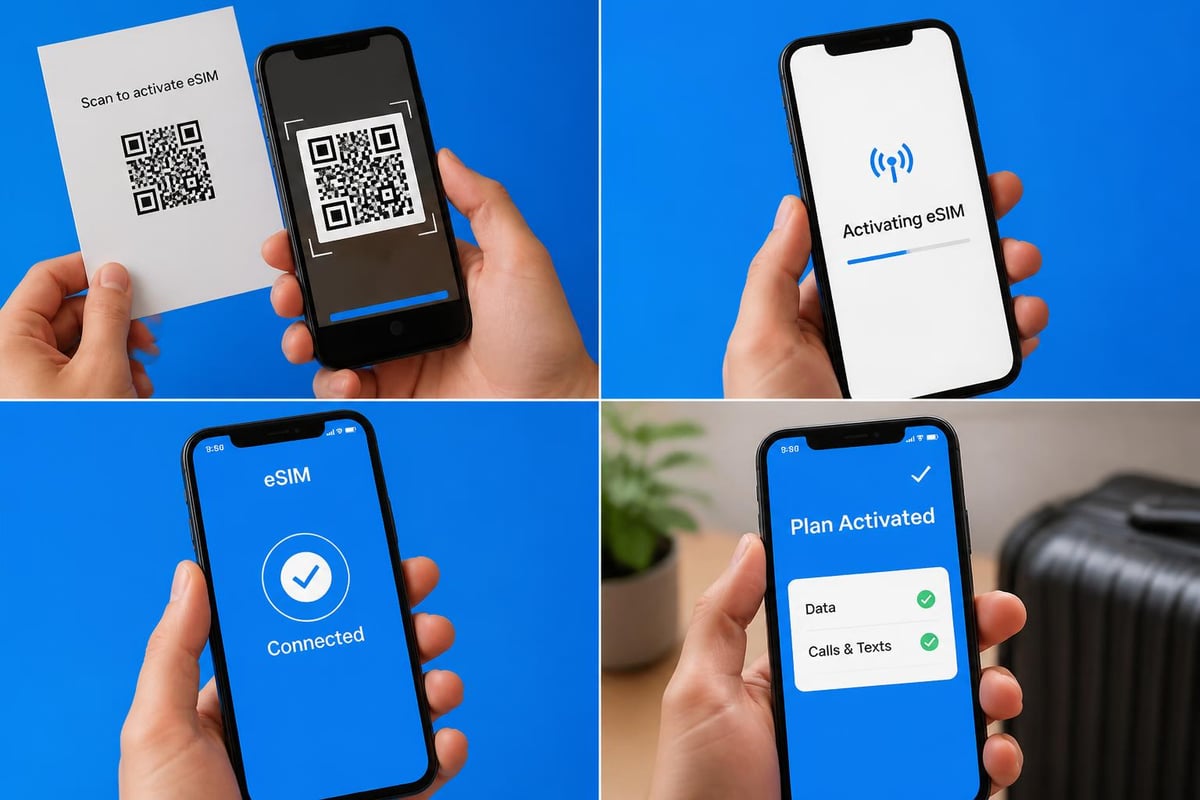
When you activate an optus esim, you're essentially downloading your mobile plan credentials directly to your phone. The process happens through a QR code or an app, and within minutes, you're connected to the Optus network.
Your device's built-in eSIM chip stores the profile information that would normally sit on a physical SIM. This means your phone number, network settings, and authentication details all exist digitally. The Optus network recognizes your device just as it would with a traditional SIM, but without any of the physical limitations.
Setting Up Your Optus eSIM
Right, let's talk about actually getting your optus esim up and running. The good news? It's considerably easier than you might think, especially if you've ever struggled with those fiddly SIM trays before.
The Activation Process Step by Step
- Check your device compatibility at the compatible devices page or Optus's support portal
- Purchase or switch to an eSIM plan through the My Optus app or website
- Receive your QR code via email or directly in the app
- Scan the code using your phone's camera in Settings
- Follow the prompts to complete installation
- Activate your plan and you're done
The official Optus device guide provides detailed instructions for various phone models, though the process is fairly consistent across devices. Most people complete the entire setup in under ten minutes.
Common Setup Challenges
Even with a straightforward process, you might hit a snag. Here's what people typically encounter:
- QR code won't scan: Try adjusting screen brightness or printing the code
- "Unable to activate" errors: Usually means you need to restart your device first
- Network not connecting: Give it 5-10 minutes after activation
- Existing plan conflicts: You may need to deactivate your old SIM first
Which Devices Support Optus eSIM?
Not every phone on the market works with eSIM technology. In 2026, though, you'll find support across most flagship and mid-range devices released in the past few years.
| Device Type | Compatible Models | Notes |
|---|---|---|
| iPhone | XR and newer (excluding SE 2020 in some markets) | Dual eSIM support from iPhone 13 onwards |
| Samsung | Galaxy S20 onwards, Z Flip/Fold series | Some budget A-series models excluded |
| Google Pixel | Pixel 3 and newer | Native eSIM support across range |
| Oppo/OnePlus | Find X3 onwards, OnePlus 9 and newer | Regional variations apply |
| Tablets | iPad Pro (2018+), iPad Air (2019+), iPad Mini (2019+) | Cellular models only |
The Whirlpool community wiki maintains an updated list of compatible devices, which can be especially helpful if you're considering a less common brand or model.
Want to see if your current phone supports eSIM functionality? Check your settings: on iPhones, go to Settings > General > About and look for Digital SIM; on Android, it's usually under Settings > Connections > SIM manager.
Optus eSIM Plans and Pricing in 2026
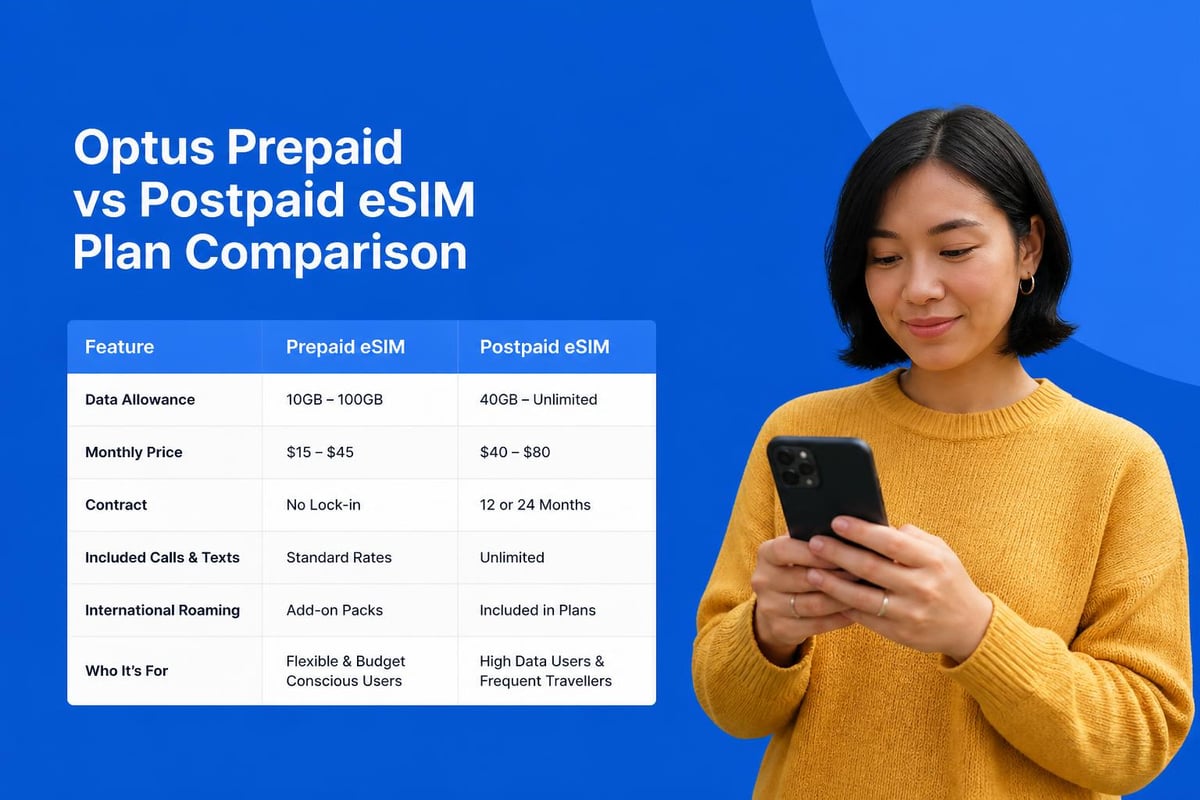
Let's get into what you'll actually pay for an optus esim plan. The good news is that Optus doesn't charge extra for eSIM access compared to traditional SIM plans. You're choosing the delivery method, not paying a premium for technology.
Current Plan Options
- Prepaid plans starting from around $30/month with varying data allowances
- Postpaid options ranging from basic to unlimited data packages
- Data-only plans perfect for tablets and secondary devices
- International roaming add-ons for travel
According to recent reviews of Optus mobile plans, their network performance has remained competitive, particularly in metropolitan areas. The 5G coverage continues to expand, which is a significant advantage if you're using eSIM for data-heavy activities.
Does eSIM Affect Your Plan Costs?
Short answer: no. Your plan pricing remains the same whether you choose physical SIM or optus esim delivery. The difference comes in convenience and flexibility rather than cost.
However, you might actually save money in certain scenarios. If you frequently travel, switching between local carriers becomes much easier with eSIM. You can keep your Optus plan active for receiving calls and texts whilst adding a local data plan as a secondary eSIM.
How Optus eSIM Compares to International Alternatives
Here's where things get interesting for travellers. Whilst an optus esim works brilliantly for domestic use, what happens when you head overseas?
Traditional roaming with Optus can get expensive quickly. That's where international eSIM providers come into play. Services like those available through platforms such as gosimless.app offer instant activation across 200+ countries without roaming fees.
The Travel Scenario
Imagine you're flying to Europe next month. You have three options:
- Keep your Optus eSIM and pay international roaming rates
- Buy a local physical SIM at your destination
- Add an international eSIM as a secondary line
Option three has become increasingly popular. You maintain your Australian number on your optus esim for important calls and texts, whilst using an affordable Australia eSIM data plan for browsing, maps, and apps when you return.
MVNO Access and Optus Network eSIM
In 2022, Optus extended eSIM support to their MVNOs, which opened up significantly more choice for consumers. Mobile Virtual Network Operators that use the Optus network can now offer eSIM services to their customers.
This means you're not limited to Optus directly. Budget-friendly providers using the same infrastructure can offer competitive pricing whilst still delivering eSIM functionality. It's worth exploring Optus mobile alternatives if you're price-conscious.
Benefits of MVNO eSIM Options
- Generally lower monthly costs
- Same network coverage as Optus
- More flexible plan structures
- Often better customer service
- No lock-in contracts on many plans
The quality of your connection depends on the network infrastructure, not whether you're with Optus directly or an MVNO. Your optus esim connects to the same towers regardless.
Managing Multiple eSIM Profiles
One of the cleverest features of eSIM technology is the ability to maintain multiple profiles on a single device. Most modern smartphones can store between 5-10 eSIM profiles, though you can typically only have two active simultaneously.
Why Would You Need Multiple Profiles?
Dual numbers: Keep work and personal lines separate on one device Travel flexibility: Pre-load destination country eSIMs before departure Backup connectivity: Maintain a secondary carrier for coverage gaps Seasonal use: Store holiday home or overseas residence numbers
Switching between stored profiles takes seconds through your phone settings. You don't need to scan new QR codes or contact providers each time you want to change which line is active.
Security and Privacy Considerations
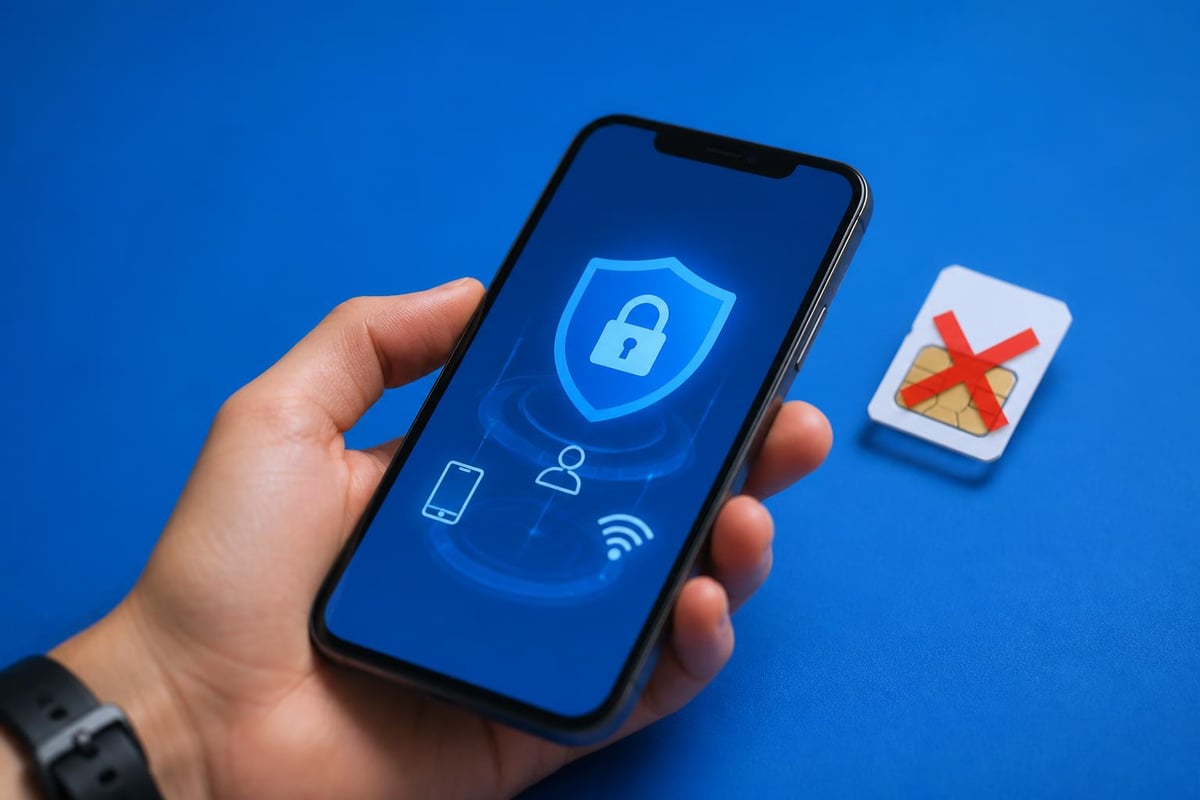
Right, let's address something important that doesn't get discussed enough. Is an optus esim more secure than a traditional SIM? Actually, yes.
Physical SIM cards can be stolen, swapped, or cloned (though it's rare). An eSIM sits inside your device's secure element, making it significantly harder for someone to hijack your mobile identity. You can't simply pop it out and use it in another phone.
| Security Feature | Physical SIM | eSIM |
|---|---|---|
| Physical theft protection | Low | High |
| SIM swap fraud risk | Moderate | Low |
| Remote deactivation | Possible | Immediate |
| Device-level encryption | No | Yes |
| Two-factor auth security | Standard | Enhanced |
That said, you still need to protect your Optus account credentials. If someone gains access to your My Optus account, they could potentially transfer your eSIM to another device. Use strong passwords and enable two-factor authentication.
Troubleshooting Common Optus eSIM Issues
Even with the best technology, things occasionally go wrong. Here's what to do when your optus esim isn't playing nicely.
Network Connection Problems
Problem: eSIM activated but no service
Try these fixes:
- Toggle Airplane mode on/off
- Restart your device completely
- Check if mobile data is enabled for the eSIM line
- Verify the eSIM is set as your default data line
- Contact Optus support if problems persist beyond 24 hours
Activation Failures
Sometimes the QR code scans but activation stalls. This usually happens when:
- Your device is already at maximum eSIM profile capacity
- There's a temporary server issue on Optus's end
- Your account has pending verification requirements
- The eSIM was previously activated on another device
The installation guide for general eSIM troubleshooting can help identify common issues, though carrier-specific problems need direct support.
Switching Back to Physical SIM
Changed your mind about eSIM? That's fine. You can request a physical SIM from Optus at any time. Your number and plan transfer across, and you simply deactivate the eSIM profile once the physical card arrives and activates.
The Future of eSIM with Optus
Looking ahead, eSIM technology will only become more prevalent. By late 2026, we're seeing phones released without physical SIM trays at all in some markets. Optus has positioned itself well for this transition.
Expect to see:
- Faster activation times as systems improve
- Better integration with My Optus app and account management
- More device compatibility across budget and mid-range phones
- Enhanced family plan management for multiple eSIM profiles
- Improved international partnerships for seamless global roaming
The technology has matured to the point where it's now the default recommendation rather than an alternative option.
Making the Switch: Is Optus eSIM Right for You?
So after all that, should you actually switch to an optus esim? Here's how to decide.
You're a good candidate if you:
- Have a compatible device you plan to keep for a while
- Travel internationally even occasionally
- Want the flexibility of dual-SIM functionality
- Prefer digital management over physical cards
- Value quick switching between carriers or plans
You might want to wait if you:
- Frequently change phones and prefer simplicity
- Have an older device without eSIM support
- Live in an area with patchy coverage where backup SIMs help
- Prefer having complete physical control over your connection
There's no wrong choice here. Some people genuinely prefer physical SIMs, and that's completely valid. The beauty of 2026 is that you typically have both options available.
For travellers particularly, understanding alternatives like dedicated travel eSIM services makes sense. Comparing options through resources like eSIM Australia guides helps you make informed decisions based on your specific usage patterns.
Real-World Optus eSIM Usage Scenarios
Let's ground all this in practical examples. How are people actually using optus esim in their daily lives?
The Frequent Flyer: Maintains Optus eSIM as primary line for Australian number, adds destination-specific eSIMs for each trip. Switches in Settings before landing. Never pays roaming charges.
The Dual-Device User: Uses optus esim in primary phone, traditional SIM in backup phone. Can receive calls on both numbers without carrying two devices everywhere.
The Small Business Owner: Personal Optus eSIM plus business line eSIM on same phone. Separates contacts and calling history. Can turn off work line after hours.
The iPad Professional: Data-only optus esim in tablet for constant connectivity. Doesn't need phone tethering or hunting for WiFi.
Each scenario leverages eSIM flexibility differently, but they all benefit from the technology's core advantages.
Whether you stick with your optus esim for everyday Australian connectivity or explore international alternatives for travel, understanding your digital SIM options puts you in control of your mobile experience. The technology has moved well beyond early-adopter territory into mainstream reliability. If you're planning international travel and want affordable data without roaming fees across 200+ countries, gosimless.app offers instant eSIM activation with flexible plans and multi-device support to complement whatever primary carrier you choose.
gosimless Team
The gosimless editorial desk — testing eSIMs, carriers and travel connectivity so you don't have to. Updated continuously from the road.