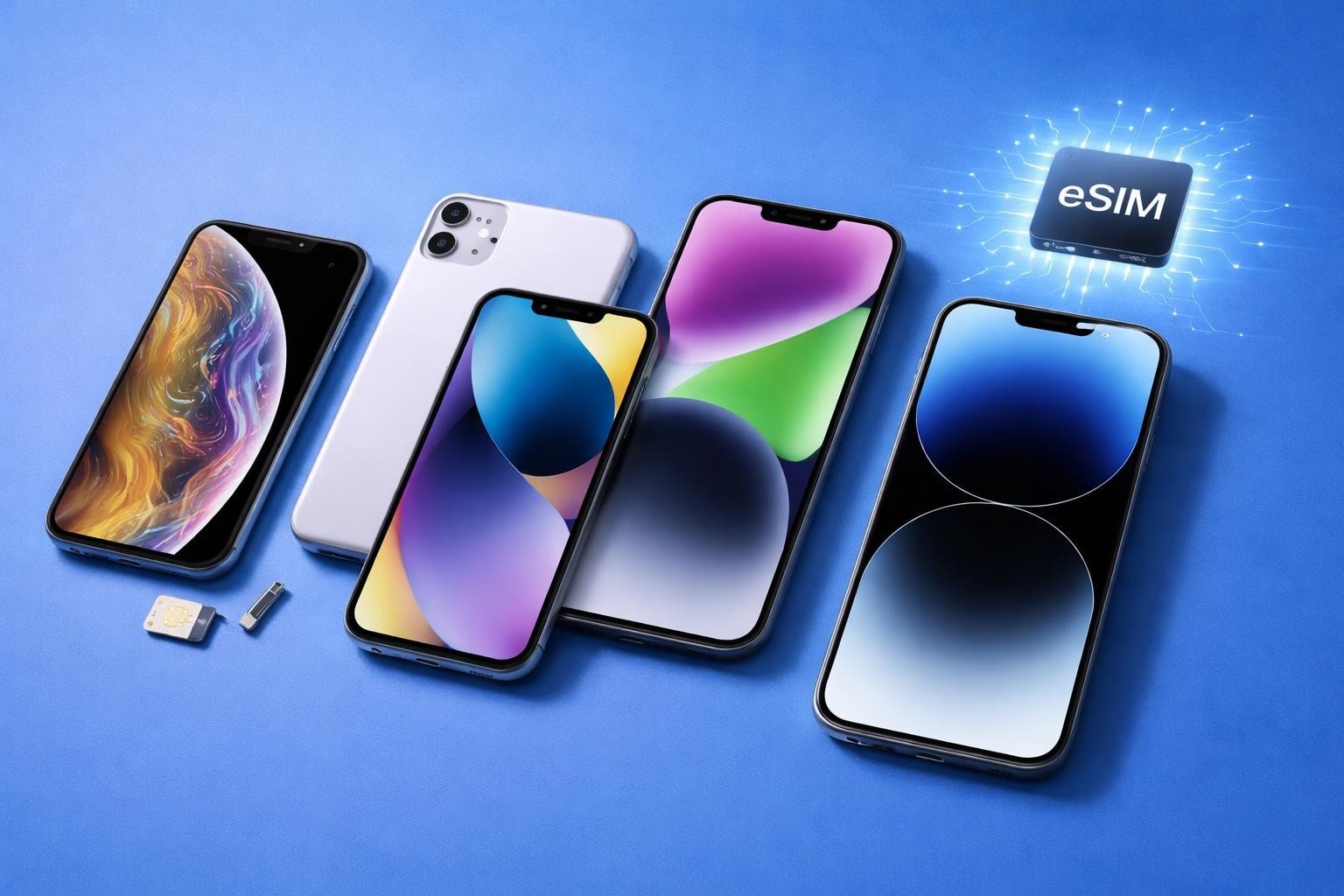
The way we connect our iPhones to mobile networks has transformed dramatically over recent years. Gone are the days when you needed to pop out a tiny SIM card tray and fiddle with a small piece of plastic. The iPhone eSIM represents a fundamental shift in how we manage mobile connectivity, offering instant activation, multiple number support, and unprecedented flexibility for travellers and business users alike. Whether you're upgrading to a new device or planning an international trip, understanding how this technology works can save you time, money, and considerable hassle.
What Is iPhone eSIM Technology
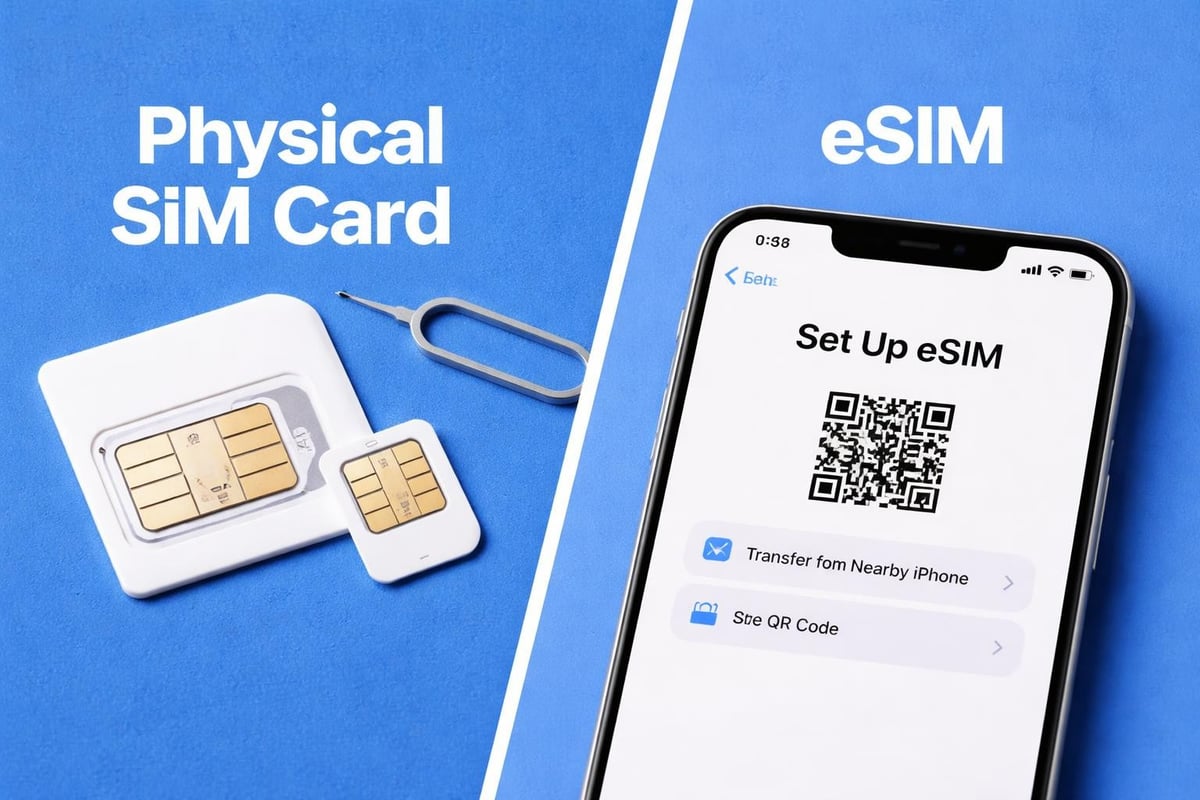
An iPhone eSIM is a digital version of the traditional SIM card, embedded directly into your device's hardware. Rather than requiring a physical card that you insert into a slot, the eSIM exists as programmable software within a secure chip built into your iPhone.
This embedded SIM technology fundamentally changes how you connect to mobile networks. Instead of waiting for a physical card to arrive by post or visiting a shop, you can download a carrier profile directly to your device within minutes. The process happens entirely digitally, making it incredibly convenient for anyone who values speed and flexibility.
How eSIM Differs From Traditional SIM Cards
The distinctions between eSIM and physical SIM cards extend beyond the obvious physical differences:
- No physical swapping required when changing carriers or plans
- Multiple profiles stored on a single device simultaneously
- Instant activation without visiting a shop or waiting for delivery
- Enhanced security with profiles locked to your device
- Reduced environmental waste from plastic SIM cards and packaging
The technology behind eSIMs allows manufacturers to create slimmer devices whilst providing users with greater control over their connectivity options. For iPhone users specifically, this means you can maintain both a personal and business number, or seamlessly switch between domestic and international plans.
Which iPhone Models Support eSIM
Apple first introduced eSIM capability with the iPhone XS, XS Max, and XR in 2018. Since then, the feature has expanded significantly across the iPhone range.
Complete List of eSIM-Compatible iPhones
| iPhone Model | Year Released | eSIM Support | Physical SIM |
|---|---|---|---|
| iPhone XS/XS Max/XR | 2018 | Single eSIM | Yes |
| iPhone 11 series | 2019 | Single eSIM | Yes |
| iPhone SE (2nd/3rd gen) | 2020/2022 | Single eSIM | Yes |
| iPhone 12 series | 2020 | Dual eSIM | Yes |
| iPhone 13 series | 2021 | Dual eSIM | Yes |
| iPhone 14 series (US) | 2022 | Dual eSIM | No |
| iPhone 14 series (International) | 2022 | Dual eSIM | Yes |
| iPhone 15 series | 2023 | Multiple eSIM | Varies by region |
The iPhone 14 marked a significant milestone as the first model sold in the United States without a physical SIM card slot at all. This US-only change signalled Apple's confidence in eSIM technology, though international models retained the traditional slot to accommodate markets where eSIM infrastructure wasn't yet widespread.
According to research on iPhone eSIM evolution, newer iPhone models can store multiple eSIM profiles simultaneously, with the iPhone 13 and later supporting up to eight stored profiles, though only two can be active at once.
Setting Up Your iPhone eSIM
Activating an iPhone eSIM is remarkably straightforward once you understand the process. The setup method varies slightly depending on your carrier and how they provide the eSIM profile.
Three Main Activation Methods
- QR Code Scanning – Your provider sends you a QR code via email or displays it on their website
- Carrier App – Download your mobile provider's app and activate directly within it
- Manual Entry – Input activation details provided by your carrier
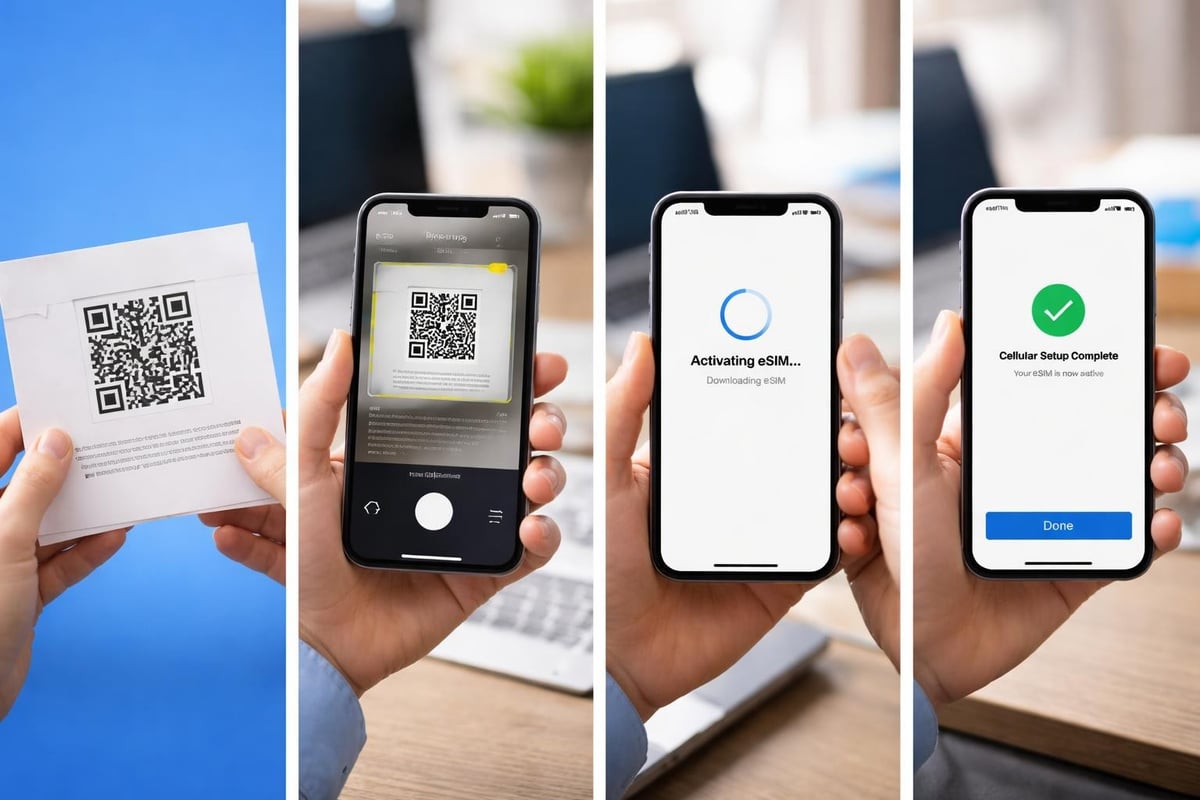
For most users, QR code activation offers the simplest experience. You'll navigate to Settings > Cellular > Add Cellular Plan, then scan the code with your iPhone's camera. The profile downloads automatically, and within moments, you're connected.
The Apple Universal Link activation method provides an even more streamlined approach. With this method, you simply tap a link sent by your provider, and your iPhone handles the rest without requiring QR code scanning.
Step-by-Step QR Code Activation
Getting your iPhone eSIM up and running takes just a few minutes when you follow the proper sequence:
- Ensure your iPhone is connected to Wi-Fi
- Navigate to Settings and tap Cellular or Mobile Data
- Select Add Cellular Plan
- Position your iPhone to scan the QR code provided
- Follow the on-screen prompts to label your plan
- Choose which line to use for calls, messages, and data
Important consideration: Some carriers require you to complete activation through their app rather than via QR code. Always check your provider's specific instructions before beginning the process.
When travelling internationally, services like USA eSIM plans allow you to activate coverage before you even board your flight, ensuring you land with immediate connectivity.
Managing Multiple eSIM Profiles
One of the iPhone eSIM's most powerful features is its ability to store and manage multiple profiles simultaneously. This capability opens up numerous practical applications for different user scenarios.
Imagine maintaining your regular personal number whilst adding a temporary travel plan, or keeping work and personal lines completely separate without carrying two devices. The flexibility is remarkable.
Dual SIM Functionality Explained
Your iPhone can have two active lines at the same time through various combinations:
- Two eSIMs active (iPhone 13 and later)
- One eSIM plus one physical SIM (most international models)
- Multiple stored eSIMs with two active at any time
When you have two active lines, you can designate which one handles specific functions. You might use your primary line for iMessage and FaceTime whilst routing voice calls through your secondary number. Data usage can be assigned to either line, or you can allow your iPhone to switch automatically based on signal strength and coverage.
The ability to switch between stored profiles makes the iPhone eSIM particularly valuable for frequent travellers. Rather than juggling physical SIM cards for different countries, you can store regional eSIM profiles and activate whichever one you need with a few taps. For more guidance on managing multiple profiles, the installation guide offers detailed instructions for various scenarios.
Business and Enterprise eSIM Deployment
For organisations managing multiple iPhones, eSIM technology simplifies device provisioning and ongoing management considerably. IT departments can remotely configure cellular plans without physically handling devices.
Apple's enterprise deployment guidance outlines how businesses can integrate eSIM activation into their mobile device management workflows. This approach proves particularly useful when onboarding new employees or distributing devices to field teams.
Companies can pre-configure eSIM profiles before distributing iPhones to staff members, ensuring employees have immediate connectivity when they receive their devices. The Mobile Device Manager solutions enable administrators to push eSIM configurations remotely, monitor data usage, and switch carriers if needed without retrieving physical devices.
Benefits for Corporate iPhone Deployments
- Centralised control over cellular connectivity across all company devices
- Reduced logistics around physical SIM card distribution
- Ability to quickly provision temporary international plans for travelling employees
- Enhanced security through remote management capabilities
- Simplified device tracking and inventory management
Troubleshooting Common iPhone eSIM Issues
Despite the technology's reliability, you might occasionally encounter challenges when working with your iPhone eSIM. Understanding common problems and their solutions helps you resolve issues quickly.
Activation Failures and Solutions
| Problem | Likely Cause | Solution |
|---|---|---|
| QR code won't scan | Poor lighting or damaged code | Request new QR code from provider |
| "Cellular Plan Cannot Be Added" | Network connection issue | Ensure strong Wi-Fi connection |
| Profile downloads but won't activate | Carrier system delay | Wait 10-15 minutes and restart iPhone |
| Dual eSIM not working | Incompatible iPhone model | Check your model supports dual eSIM |
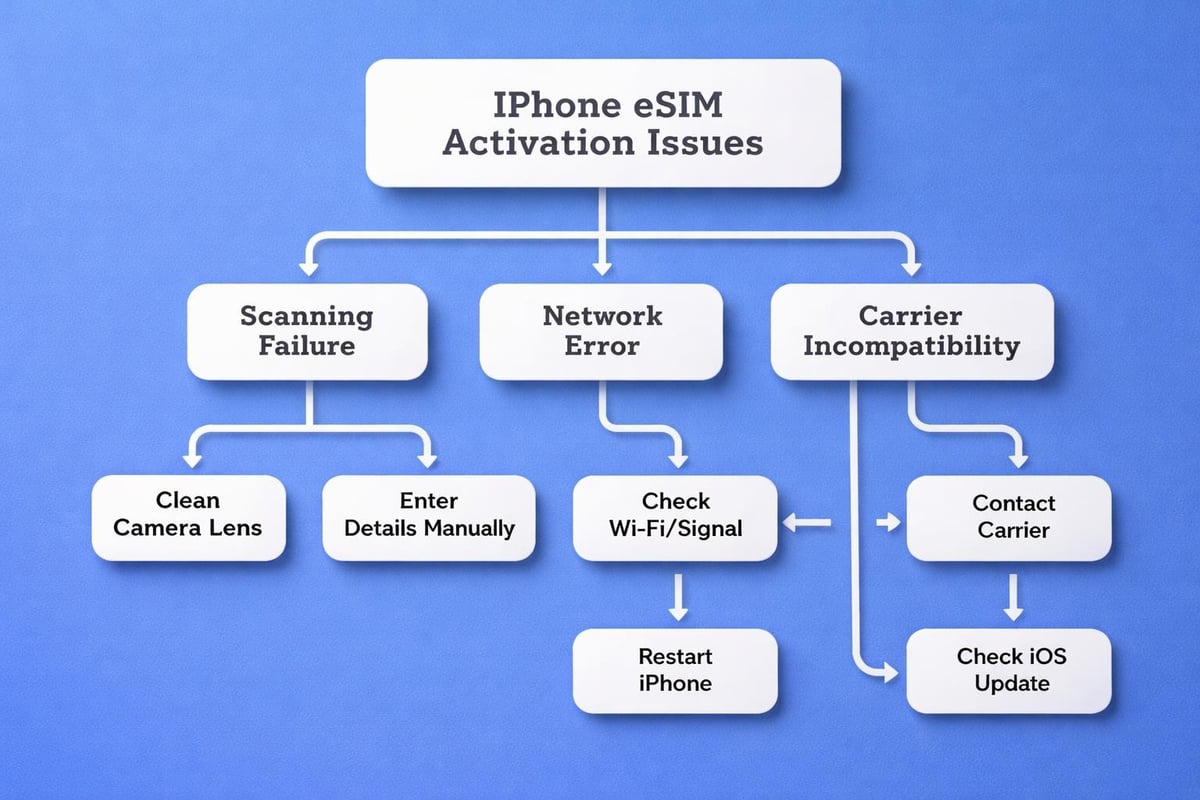
When your iPhone eSIM refuses to activate, start with the basics. Restart your device, verify your Wi-Fi connection is stable, and ensure you're running the latest iOS version. Many activation issues resolve themselves after a simple reboot.
If problems persist, contact your carrier's support team. They can verify whether the eSIM profile was generated correctly and check for any account-level restrictions preventing activation. Sometimes carriers need to reset your eSIM profile on their end before it will activate properly on your device.
Regional Compatibility Considerations
Not all iPhone eSIM features work identically worldwide. Certain capabilities depend on your geographic location and local carrier support.
China mainland iPhones, for instance, handle eSIM differently due to regulatory requirements. Hong Kong and Macao models offer full eSIM functionality, but mainland Chinese variants have limited support. Similarly, some carriers in specific countries haven't fully implemented eSIM technology, restricting your options when selecting providers.
Before purchasing an iPhone specifically for its eSIM capabilities whilst abroad, verify that both the device variant and local carriers support the features you need. The compatible devices guide can help you understand regional variations and ensure your iPhone model works with your intended provider.
Travel and International Use Cases
The iPhone eSIM truly shines when you're travelling internationally. Rather than hunting for a local SIM card shop at the airport or paying extortionate roaming charges, you can activate local coverage before departure or immediately upon arrival.
Modern eSIM providers offer coverage in over 200 countries, with plans you can purchase and activate entirely through apps or websites. This convenience eliminates the stress of connectivity concerns when travelling.
Pre-Trip eSIM Planning
Smart travellers activate their international eSIM profiles before leaving home. This approach ensures you land with working data, allowing you to navigate to your accommodation, contact local services, and stay in touch with people back home without scrambling to find Wi-Fi.
The process typically involves:
- Researching eSIM providers covering your destination
- Purchasing a plan suited to your data needs
- Installing the eSIM profile whilst still at home
- Testing the profile briefly to ensure proper installation
- Setting your travel eSIM as your data line once you arrive
Many international eSIM providers offer regional plans covering multiple countries. If you're touring several European nations, for instance, a single multi-country plan proves more convenient than switching profiles at each border. For specific destinations, you'll find detailed information about coverage options through resources like the eSIM plans directory.
Maintaining Your Primary Number Whilst Travelling
One question frequently arises: "Can I keep my home number active whilst using a travel eSIM?" Absolutely. This is where dual SIM functionality becomes invaluable.
You can set your home number to remain active for calls and messages whilst routing all data through your travel eSIM. This configuration lets you receive important calls on your regular number without incurring data roaming charges. Your iPhone intelligently manages both connections, ensuring messages and calls reach you whilst your browsing, maps, and app usage consume data from the local eSIM plan.
Security and Privacy Advantages
The iPhone eSIM offers several security benefits compared to traditional physical SIM cards. Because the eSIM is embedded in your device's hardware, it cannot be physically removed and inserted into another phone.
This permanence creates a significant barrier against SIM swap fraud, where criminals attempt to port your number to a different device. With an eSIM, executing such an attack requires considerably more sophisticated methods, as the profile cannot simply be ejected and transferred.
Additionally, eSIM profiles are cryptographically signed and securely downloaded to your device. The authentication process ensures that only legitimate carrier profiles can be installed, protecting against rogue profiles that might compromise your device or data.
Remote Management Benefits
Should your iPhone be lost or stolen, eSIM technology allows carriers to remotely deactivate your cellular service more quickly than with physical SIMs. This capability prevents unauthorised usage and protects against fraudulent charges.
For privacy-conscious users, the ability to quickly switch between different eSIM profiles offers enhanced anonymity options. You can use separate numbers for different purposes, compartmentalising your digital identity more effectively than ever before.
Costs and Plan Flexibility
One of the most compelling aspects of iPhone eSIM technology is how it's transformed pricing structures for mobile connectivity. The elimination of physical distribution costs means providers can offer more competitive rates, particularly for international and travel-focused plans.
Traditional roaming charges from major carriers can reach £5-10 per day or more. In contrast, eSIM-specific providers frequently offer weekly or monthly plans at a fraction of that cost, with transparent pricing and no hidden fees.
Comparing eSIM Provider Options
Different eSIM providers cater to different needs and budgets:
- Traditional mobile networks – Often offer eSIM versions of standard plans with similar pricing
- Travel-focused eSIM services – Specialise in short-term international plans with competitive data rates
- Global eSIM platforms – Provide coverage across numerous countries with flexible plan durations
- Regional specialists – Focus on specific geographic areas with optimised pricing and coverage
When evaluating options, consider not just the headline price but also the included data allowance, coverage quality, plan validity period, and activation ease. Some providers offer "pay-as-you-go" models where you purchase data in fixed amounts, whilst others provide unlimited plans for specific durations.
The FAQ section addresses common questions about pricing, validity periods, and how to select the right plan for your specific needs.
Future of iPhone eSIM Technology
As we progress through 2026, eSIM adoption continues accelerating globally. More carriers worldwide are implementing eSIM support, and Apple shows no signs of reversing its commitment to the technology.
Industry analysts predict that within the next few years, physical SIM cards will become largely obsolete in developed markets. The iPhone's transition mirrors broader industry trends, with Android manufacturers increasingly embracing eSIM technology across their premium and mid-range devices.
Upcoming Enhancements and Capabilities
Apple continues refining the iPhone eSIM experience with each iOS update. Recent improvements include:
- Faster profile switching with reduced activation times
- Enhanced carrier selection interfaces
- Improved dual eSIM battery optimisation
- Better visual indicators for active lines
- Streamlined profile management tools
The installation process has evolved significantly since eSIM's introduction, becoming more intuitive with each iteration. What once required multiple steps and sometimes technical support now happens almost instantly through simplified activation methods.
Looking ahead, we can expect further integration between eSIM technology and other iPhone features. Automatic carrier switching based on location, AI-powered plan recommendations, and even tighter integration with services like Apple Pay for seamless plan purchases are all plausible developments.
Carrier Support and Availability
Not all mobile carriers worldwide support iPhone eSIM technology yet, though the list grows monthly. Major networks in North America, Europe, Asia-Pacific, and increasingly in other regions now offer eSIM activation.
Before committing to an eSIM-only device or switching your primary number to eSIM, verify your preferred carrier supports the technology. Most major networks now provide eSIM options, but smaller regional carriers may still be developing their implementation.
Checking Carrier Compatibility
Your carrier's website typically indicates whether they support eSIM and which iPhone models are compatible with their service. Look for specific eSIM information pages or compatibility checkers.
When contacting customer service, ask specifically about:
- Whether your current plan can be converted to eSIM
- Any fees associated with eSIM activation
- How to receive your eSIM activation details
- Whether you can switch back to physical SIM if needed
- Support for dual eSIM configurations
The transition from physical SIM to eSIM is usually free with most major carriers, though some charge nominal fees. Understanding your carrier's specific policies prevents surprises during activation.
Environmental Impact
The shift towards iPhone eSIM technology carries environmental benefits that extend beyond mere convenience. Eliminating billions of plastic SIM cards annually reduces petroleum-based plastic consumption and the associated manufacturing emissions.
Physical SIM cards require packaging, shipping, and distribution through retail networks. Each of these stages consumes resources and generates carbon emissions. By contrast, eSIM profiles transmit digitally, eliminating these logistical requirements entirely.
Additionally, the reduced need for physical components allows manufacturers to design more compact devices or allocate the saved space to other features like larger batteries. This efficiency contributes to longer device lifespans and reduced electronic waste.
For environmentally conscious consumers, choosing eSIM over physical SIM represents a small but meaningful way to reduce your technological footprint. When multiplied across millions of iPhone users globally, the cumulative impact becomes substantial.
Understanding iPhone eSIM technology empowers you to take full control of your mobile connectivity, whether you're managing multiple numbers, travelling internationally, or simply seeking more flexible plan options. The technology has matured significantly since its introduction, offering reliability and convenience that physical SIM cards simply cannot match. If you're ready to experience truly flexible global connectivity without the hassle of physical SIM cards or expensive roaming fees, gosimless.app provides instant eSIM activation across 200+ countries with affordable plans, secure payments, and seamless multi-device support that works perfectly with your iPhone.
gosimless Team
The gosimless editorial desk — testing eSIMs, carriers and travel connectivity so you don't have to. Updated continuously from the road.