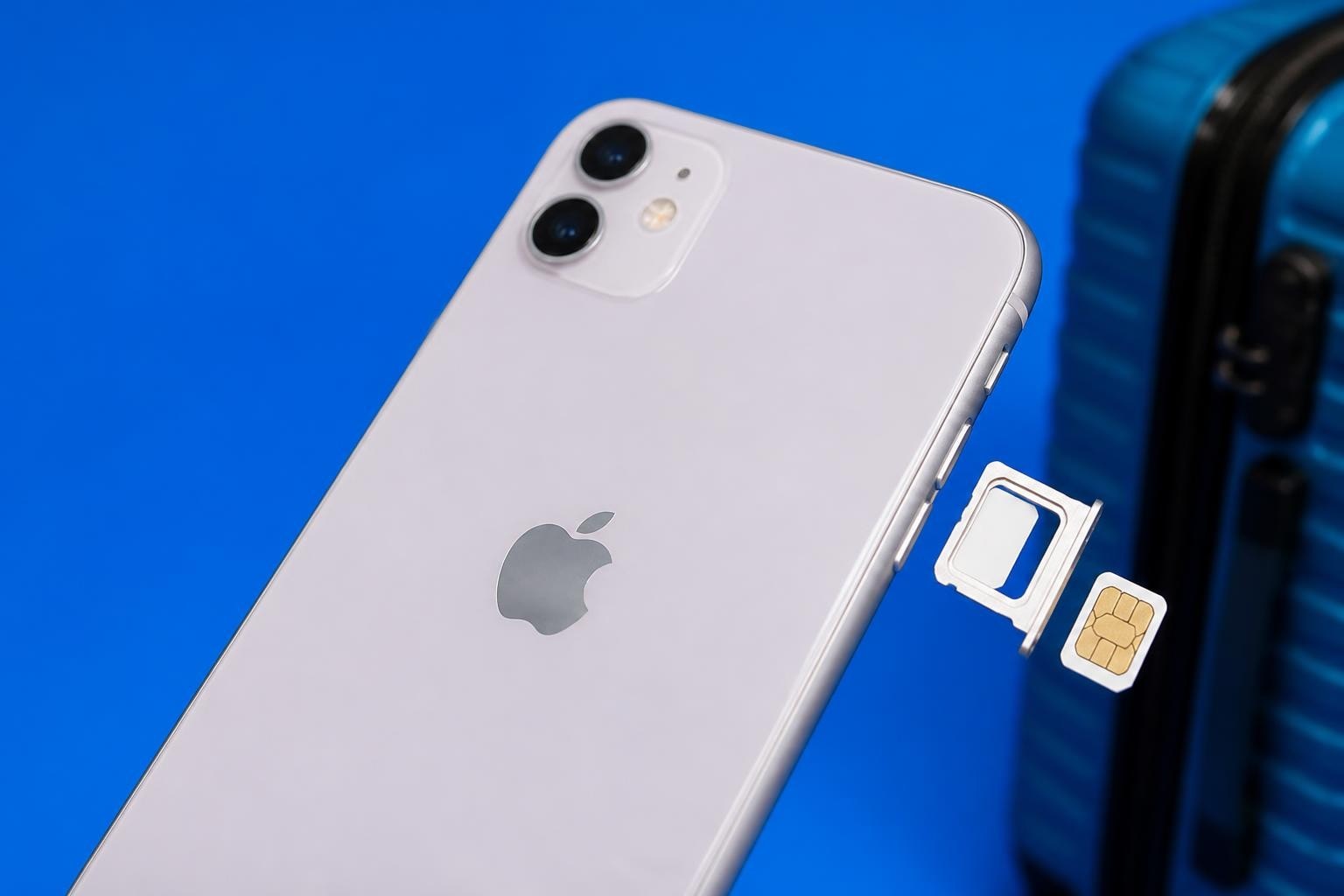
The iPhone 11 revolutionised mobile connectivity when it launched, bringing eSIM technology to a more accessible price point than its predecessors. If you've been wondering whether your iPhone 11 supports eSIM or how to make the most of this digital SIM capability, you're in exactly the right place. This technology isn't just a gimmick – it's genuinely transforming how we stay connected, especially when travelling internationally or managing multiple phone numbers. Let's dive into everything you need to know about using your iPhone 11 esim capabilities to their fullest potential.
What Exactly Is eSIM Technology?
Before we get into the specifics of your iPhone 11 esim setup, it's worth understanding what eSIM actually means. The 'e' stands for embedded, which tells you the fundamental difference straight away.
Unlike traditional SIM cards that you physically insert into your phone, an eSIM is built directly into your device's hardware. It's a tiny chip soldered onto the motherboard that can be programmed remotely with your carrier information. Think of it as a digital SIM card that lives permanently inside your iPhone.
The iPhone 11 eSIM Capability
Your iPhone 11 came equipped with both a traditional nano-SIM slot and eSIM functionality. This dual capability means you can run two different phone numbers or plans simultaneously – one on the physical SIM and another on the eSIM.
All iPhone 11 models support this feature:
- iPhone 11
- iPhone 11 Pro
- iPhone 11 Pro Max
The implementation is particularly clever because Apple designed the system to be carrier-agnostic. According to Apple's official eSIM setup guide, most major carriers worldwide now support eSIM activation on these devices.
Setting Up Your iPhone 11 eSIM
Getting your iPhone 11 esim activated is remarkably straightforward, though the exact process varies slightly depending on your carrier and location. Let me walk you through the most common methods.
Method One: QR Code Activation
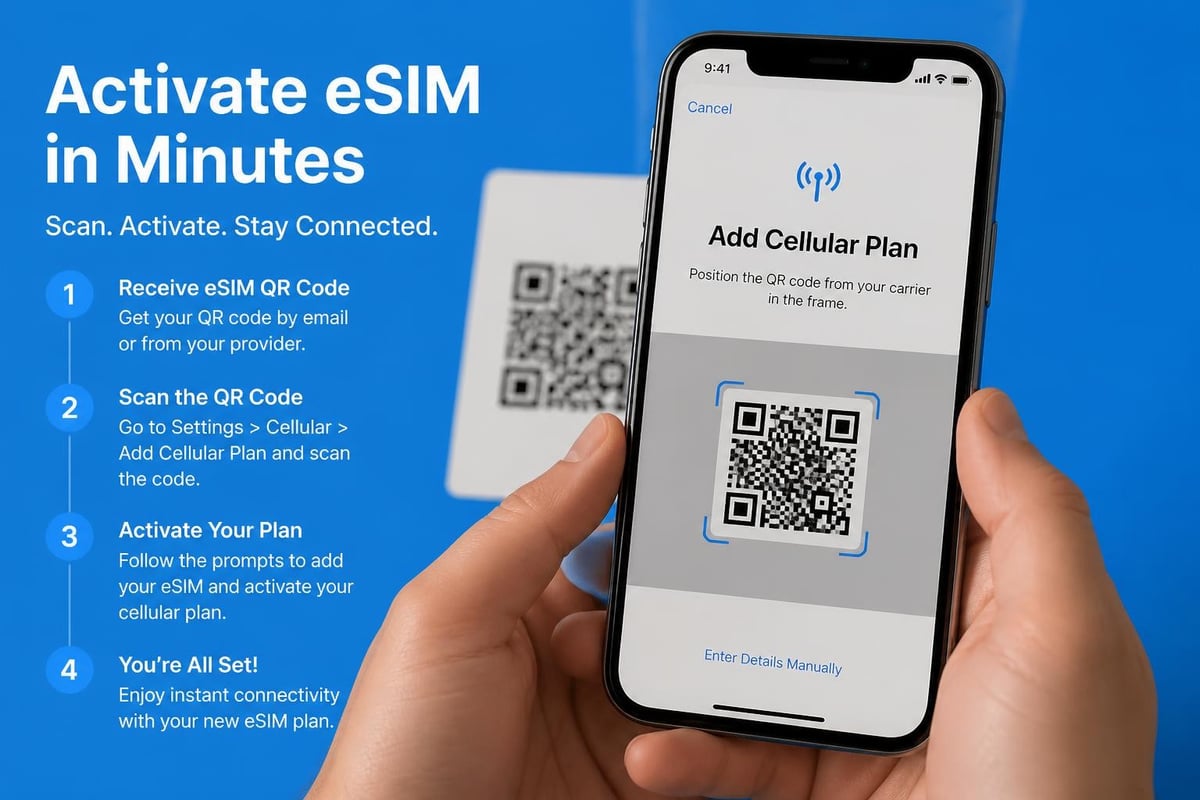
This is by far the most popular way to activate an eSIM on your iPhone 11. Your carrier or eSIM provider will send you a QR code, and you'll scan it using your phone's camera.
- Navigate to Settings on your iPhone
- Tap Cellular or Mobile Data
- Select Add Cellular Plan
- Point your camera at the QR code provided by your carrier
- Follow the on-screen prompts to complete activation
The AT&T setup guide provides excellent visual examples of this process if you're a visual learner. The entire activation typically takes under five minutes.
Method Two: Manual Entry
Some carriers provide activation details that you'll need to enter manually. This method takes slightly longer but works just as reliably.
You'll need specific information from your carrier:
- SM-DP+ address
- Activation code
- Confirmation code (if required)
To enter these details manually, follow the same path to Add Cellular Plan, then tap "Enter Details Manually" at the bottom of the screen.
Method Three: Carrier App Activation
Many carriers now offer dedicated apps that handle the entire eSIM activation process. You simply download the app, log into your account, and the app configures everything for you. This method is particularly convenient if you're already a customer with that carrier.
Why Dual SIM Matters for iPhone 11 Users
The real magic of your iPhone 11 esim capability shines when you understand how Dual SIM functionality transforms your mobile experience. Having two active lines on one device opens up possibilities that weren't practical just a few years ago.
Personal and Business Separation
Many professionals use Dual SIM to maintain separate numbers for work and personal calls. You can assign different ringtones, manage contacts separately, and choose which line to use for outgoing calls – all without carrying two phones.
| Use Case | Primary SIM | eSIM |
|---|---|---|
| Business travel | Personal number | Local travel data |
| International living | Home country number | Local number |
| Work/life balance | Personal calls | Work number |
| Cost savings | Voice calls | Data-only plan |
Travel Without the Hassle
Here's where eSIM technology truly excels. Traditional international roaming charges can be eye-wateringly expensive, but with your iPhone 11 esim, you've got better options.
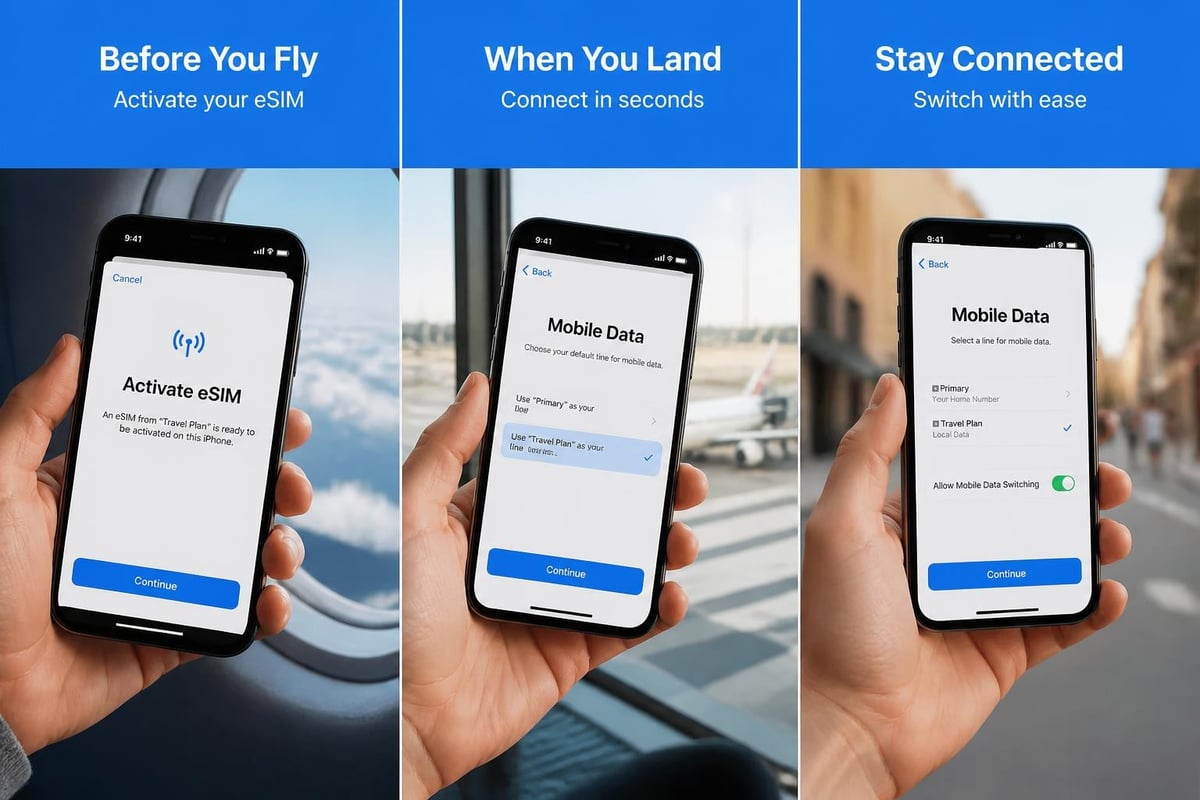
When you land in a new country, you can purchase a local data plan and activate it instantly without hunting for a SIM card vendor or dealing with tiny plastic cards. Your home number stays active on your physical SIM for calls and texts, whilst your eSIM handles data using affordable local rates. For instance, travellers heading to multiple European destinations can grab instant Europe eSIM plans that work across numerous countries without switching anything.
Choosing Between Physical SIM and eSIM
One question I hear constantly is: "Should I use my primary carrier on the physical SIM or the eSIM?" There's no universally correct answer, but here's how to think through the decision.
Use your physical SIM for your primary, long-term carrier – especially if you've negotiated a specific plan or have a complicated family arrangement. Physical SIMs are easier to move between devices if you upgrade your phone.
Use your eSIM for temporary needs, travel plans, or secondary numbers. The flexibility of remotely activating and deactivating eSIM plans makes them perfect for short-term requirements.
Network Priority and Data Usage
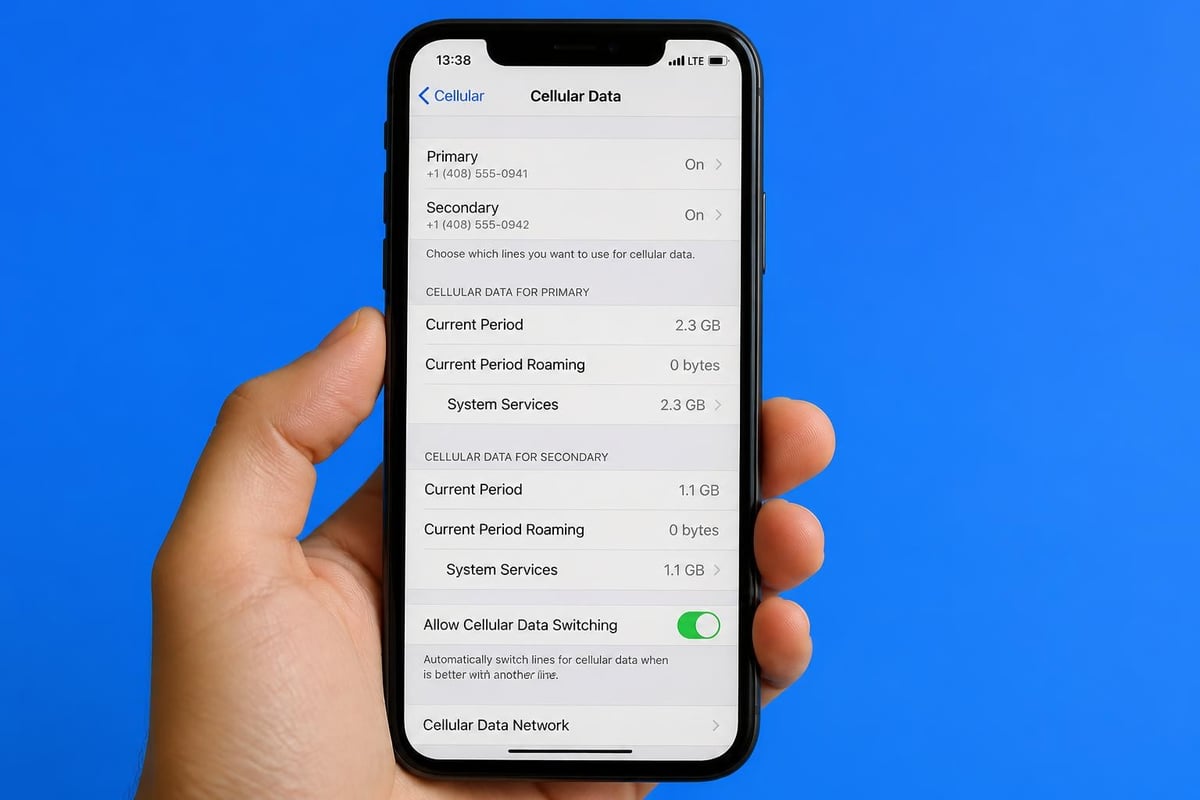
Your iPhone 11 lets you designate which line handles cellular data. Navigate to Settings > Cellular > Cellular Data and choose your preferred line. You can even set "Allow Cellular Data Switching" to let your iPhone use whichever line has better reception.
For voice calls and messages, you can set defaults or choose each time you make a call. The system is remarkably intuitive once you've spent a day or two with it.
Compatible Carriers and Coverage
The iPhone 11 esim works with hundreds of carriers globally, though availability varies by region. In 2026, support has expanded dramatically compared to the early days of eSIM technology.
Major Carrier Support
Most tier-one carriers now support eSIM activation:
- UK: EE, Vodafone, O2, Three
- USA: AT&T, T-Mobile, Verizon
- Europe: Deutsche Telekom, Orange, Telefónica
- Asia-Pacific: Singtel, Optus, SoftBank
You'll find comprehensive compatibility information on the compatible devices page which lists specific carrier support by region.
Travel eSIM Providers
Beyond traditional carriers, specialist eSIM providers have emerged specifically for travellers. These companies offer data-only plans across multiple countries without requiring local carrier contracts.
The advantage? You can compare prices, coverage, and data allowances from multiple providers before committing. Many also offer regional plans covering entire continents, which is brilliant if you're island-hopping in Southeast Asia or touring multiple European countries.
Troubleshooting Common iPhone 11 eSIM Issues
Even with straightforward technology, you'll occasionally hit snags. Let's address the most common problems people face with their iPhone 11 esim setup.
QR Code Won't Scan
If your camera isn't recognising the QR code, try these steps:
- Ensure the QR code is well-lit and your screen brightness is turned up
- Clean your camera lens
- Screenshot the QR code and open it in Photos for a clearer view
- Try manual entry instead
eSIM Won't Activate
Activation failures usually stem from a few predictable causes. First, verify your iPhone is running iOS 12.1 or later – earlier versions don't support eSIM. Second, check you've got a stable internet connection, preferably Wi-Fi. The activation process requires downloading your eSIM profile.
Can't Remove or Transfer eSIM
Unlike physical SIMs, you can't simply pop out an eSIM. To remove an eSIM plan, go to Settings > Cellular > select the plan you want to remove > Remove Cellular Plan. This permanently deletes the eSIM profile from your device.
Transferring an eSIM to a new iPhone requires contacting your carrier for a new QR code. Some carriers now support eSIM transfer during iPhone-to-iPhone setup, but this isn't universal yet.
Managing Multiple eSIM Profiles
Here's something that surprises many iPhone 11 users: you can store multiple eSIM profiles on your device, though only one can be active alongside your physical SIM at any time.
This capability is incredibly useful for frequent travellers. You might have eSIM profiles for:
- Your home country backup plan
- US travel
- European travel
- Asian destinations
You can switch between stored profiles without needing new QR codes each time. Just go to Settings > Cellular and tap the plan you want to activate. Deactivate the current one first if you've hit the two-active-lines limit.
Labelling Your Plans
Don't underestimate the value of clear labels. When you're managing multiple numbers, calling them "Primary" and "Secondary" gets confusing fast.
Instead, use descriptive labels:
- "UK Personal"
- "US Work"
- "Travel Data"
- "Mum's Old Number"
Set these labels during activation or change them anytime in Settings > Cellular > tap the plan > Cellular Plan Label.
Security and Privacy Considerations
Using eSIM technology on your iPhone 11 raises some security questions worth addressing. The good news? eSIM is actually more secure than traditional SIM cards in several ways.
Physical security improves because there's nothing to physically steal. SIM swapping fraud, where criminals convince carriers to port your number to a new SIM, becomes slightly more difficult with eSIM – though not impossible, so remain vigilant.
Remote management is both a feature and a potential vulnerability. Carriers can update or disable your eSIM remotely, which is convenient but requires trusting your provider's security practices.
Always activate eSIM plans from official carrier apps or verified websites. The installation guide includes security best practices for eSIM activation to help you avoid dodgy providers.
Cost Comparison: eSIM vs Traditional Roaming
Let's talk money, because that's often the primary motivation for exploring iPhone 11 esim options. Traditional international roaming can cost £5-15 per day, whilst eSIM plans typically offer better value.
Real-World Example
Imagine a two-week holiday to Australia:
Traditional UK carrier roaming:
- Daily charge: £6/day
- Total cost: £84 for 14 days
- Data cap: Often limited to 1-2GB per day
eSIM travel plan:
- Upfront cost: £15-30 for 5-10GB
- Total cost: £15-30 for 14 days
- Data allocation: Fixed amount, use as needed
The savings become even more dramatic on longer trips or when visiting multiple countries. As detailed in MoneySavingPro's guide, eSIM technology can genuinely reduce international connectivity costs by 60-80%.
Practical Tips for iPhone 11 eSIM Users
After helping countless people set up their iPhone 11 esim configurations, I've gathered some practical wisdom worth sharing.
Pre-Download Your eSIM
If you're travelling, activate your travel eSIM before you leave home. Most providers let you install the profile early – it simply won't connect until you're in the coverage area. This saves you wrestling with unfamiliar Wi-Fi networks at the airport.
Keep Your Physical SIM
Don't ditch your physical SIM slot in favour of going fully eSIM unless you're absolutely certain. The physical SIM provides a backup option and easier device switching if your iPhone needs repair.
Monitor Your Data Usage
With Dual SIM active, keeping track of which line is consuming data becomes crucial. Go to Settings > Cellular and scroll down to see cellular data usage broken down by SIM. This prevents bill shock from accidentally using the wrong line.
Screenshot Your QR Codes
After successfully activating an eSIM, take a screenshot of the QR code and store it securely. Some carriers charge for replacement codes, and having a backup can save hassle if you need to reinstall the profile.
Advanced iPhone 11 eSIM Features
Beyond basic activation, your iPhone 11 esim supports some sophisticated features that power users will appreciate.
Cellular Data Fallback
When both SIMs are active, your iPhone can automatically switch to your secondary line if the primary loses signal. Enable this under Settings > Cellular > Cellular Data > Allow Cellular Data Switching. Perfect for areas where carrier coverage varies.
Different Networks for Voice and Data
You can route voice calls through one SIM whilst using another for data. This configuration works brilliantly when you've got unlimited calls on one plan but cheaper data on another.
App-Specific Line Selection
Certain apps can be assigned to specific lines. WhatsApp, for instance, can use your business number whilst iMessage uses your personal line. This granular control helps maintain separation between different aspects of your life.
The Apple cellular setup guide walks through these advanced configurations with helpful screenshots.
Future-Proofing with eSIM Technology
Choosing to actively use your iPhone 11 esim isn't just about immediate benefits – you're also preparing yourself for the inevitable future of mobile connectivity.
Industry analysts predict that physical SIM cards will become obsolete within the next 5-7 years. Major manufacturers are already designing phones with eSIM-only configurations. By mastering eSIM technology now on your iPhone 11, you're getting ahead of this curve.
The technology also integrates seamlessly with newer devices. If you eventually upgrade to a newer iPhone model, your eSIM management skills transfer directly. Many of the same processes and interfaces carry over across Apple's ecosystem.
Regional Variations and Restrictions
Not all iPhone 11 models support eSIM equally. This primarily affects devices purchased in mainland China, Hong Kong, and Macao, where regulatory requirements led Apple to implement Dual SIM differently.
China models use two physical nano-SIM slots instead of eSIM. If you purchased your iPhone 11 in China, it won't have eSIM capability at all.
Hong Kong and Macao models also use Dual Physical SIM in certain variants.
For everyone else globally, the standard iPhone 11 esim configuration with one physical slot and one eSIM works as described throughout this guide.
Checking Your Model
Not sure which version you own? Go to Settings > General > About and look at your Model Number. Compare it against Apple's technical specifications to confirm eSIM support.
eSIM for Specific Use Cases
Different users benefit from iPhone 11 esim technology in distinctly different ways. Let's explore some specific scenarios.
Digital Nomads and Remote Workers
If you're location-independent, eSIM transforms connectivity from a constant headache into a non-issue. Land in Lisbon for a month? Grab a Portuguese eSIM. Head to Bali next? Switch to an Indonesian plan. Your home number stays active on the physical SIM for banking verification codes and family calls.
Frequent Business Travellers
Corporate travellers often need reliable connectivity the moment they land, without waiting for hotel Wi-Fi or hunting for SIM cards. Pre-loading eSIM profiles for your regular destinations means you're connected before you've cleared customs. Check the eSIM guides for destination-specific recommendations.
Budget-Conscious Users
Teenagers, students, and anyone watching spending carefully can use eSIM strategically. Keep a basic plan on your physical SIM for emergencies, then use prepaid eSIM data bundles for your actual internet needs. Many eSIM providers offer pay-as-you-go options without monthly commitments.
Privacy-Focused Individuals
Some users value the ability to maintain separate numbers for different contexts without revealing their primary number. eSIM makes this practical without carrying multiple devices.
Your iPhone 11 esim capability represents a significant shift in how we think about mobile connectivity, offering flexibility that simply wasn't available with traditional SIM cards alone. Whether you're travelling internationally, managing work and personal life separately, or simply looking for more cost-effective mobile plans, the Dual SIM functionality unlocks genuinely useful possibilities. Ready to experience truly flexible global connectivity? Head over to gosimless.app for instant eSIM activation across 200+ countries with affordable plans, no roaming fees, and setup that takes just minutes.
gosimless Team
The gosimless editorial desk — testing eSIMs, carriers and travel connectivity so you don't have to. Updated continuously from the road.